*/
Make 2026 the year you learn to love Excel. Elizabeth Bowden shares tips, tricks and time-savers in part four of her series
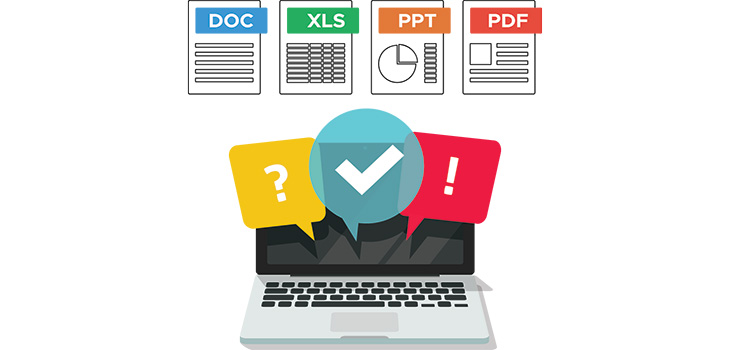
Welcome back to bite-sized top tips. This time, we’re focusing on Microsoft (MS) Excel. Excel is my favourite MS app. If you are not an Excel fan, make 2026 the year you learn to love Excel. Your life will be better. As ever, use a dummy document and get experimenting.
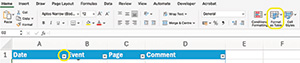
If you use Excel for nothing else, use it for chronologies. As you work, add events to your sheet row by row; do not worry about date order. Quickly create a sortable table via Home > Format as Table (pick the look you want). Or highlight the cells to add data filters to header cells: Data/Sort & Filter/Filter. Use the arrows to sort by date.
The other best use of Excel is for costs; having costs in Excel format in court will make your life exponentially easier. Set up Excel cost templates. As a minimum, have an N260 template so you can amend the hourly rates/time, etc., in real time.
Freeze pane in Excel makes chronologies easier to work with: View/Freeze Panes, then choose to freeze the top row, first column, or multiple rows/columns by selecting a cell and then applying ‘Freeze Panes,’. This will make the headers visible while you scroll.
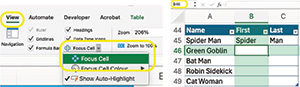
The focus cell highlights the cell you are in. Toggle the focus cell on/off via View > Focus cell. Also, if you get lost in your sheet, type in A1 top left and then press ‘enter’ to return to cell A1, it works for any cell reference.
The AutoSum function saves time (Home/ Σ AutoSum). AutoSum can do other auto-sums, e.g. average. At the bottom of the workbook, the average, count and sum of selected cells are automatically displayed. Press and hold ‘command’ to select non-adjacent cells.

Seeing #### just means the data is too big to display. You can either resize by dragging the column edge or use Home/Format/Auto-fit Column Width to resize all columns in one go (or, if resizing rows, select rows).
Stop the reference changing when you copy or drag the formula to other cells by using an absolute cell reference. If the formula is =SUM(B2*E12), and you want to retain the reference to B2 use the $ to lock it to the absolute cell =SUM($B$2*E12).
If you have data in one workbook across multiple sheets, seeing the other sheets simultaneously makes working with data so much easier. There is a magic button that does this: View/New Window lets you see and work on all the sheets at the same time.
You can use PDF apps to export as an Excel file – but from within Excel, you can directly insert from PDF or an image: Insert/From Picture/Picture from File (or clipboard if you copied it that way) and select the image/PDF with the data you want inserted.
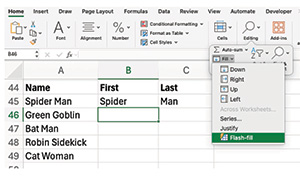
If data in a cell needs separating, use Flash-fill. For example, if names in Column A are ‘Jo Bloggs’, sorting only works by first name. To sort by surname, you need to split the data. Flash-fill will do this quickly. In one row, set out the data as you want it (to give Excel an example). Then use Flash-fill.
To find name duplications quickly, highlight the cells, then select Conditional Formatting/Highlight Cell Rules/Duplicate Values. Explore the other conditional formatting options that can help you with your case preparation, e.g. highlighting cells that contain specific text.
-(002).jpeg?sfvrsn=931a77b_2)
Elizabeth Bowden is a barrister at College Chambers, Southampton and practises in family finances and civil litigation. Elizabeth is never too far from a spreadsheet and is evangelical about tech.
Welcome back to bite-sized top tips. This time, we’re focusing on Microsoft (MS) Excel. Excel is my favourite MS app. If you are not an Excel fan, make 2026 the year you learn to love Excel. Your life will be better. As ever, use a dummy document and get experimenting.
If you use Excel for nothing else, use it for chronologies. As you work, add events to your sheet row by row; do not worry about date order. Quickly create a sortable table via Home > Format as Table (pick the look you want). Or highlight the cells to add data filters to header cells: Data/Sort & Filter/Filter. Use the arrows to sort by date.
The other best use of Excel is for costs; having costs in Excel format in court will make your life exponentially easier. Set up Excel cost templates. As a minimum, have an N260 template so you can amend the hourly rates/time, etc., in real time.
Freeze pane in Excel makes chronologies easier to work with: View/Freeze Panes, then choose to freeze the top row, first column, or multiple rows/columns by selecting a cell and then applying ‘Freeze Panes,’. This will make the headers visible while you scroll.
The focus cell highlights the cell you are in. Toggle the focus cell on/off via View > Focus cell. Also, if you get lost in your sheet, type in A1 top left and then press ‘enter’ to return to cell A1, it works for any cell reference.
The AutoSum function saves time (Home/ Σ AutoSum). AutoSum can do other auto-sums, e.g. average. At the bottom of the workbook, the average, count and sum of selected cells are automatically displayed. Press and hold ‘command’ to select non-adjacent cells.
Seeing #### just means the data is too big to display. You can either resize by dragging the column edge or use Home/Format/Auto-fit Column Width to resize all columns in one go (or, if resizing rows, select rows).
Stop the reference changing when you copy or drag the formula to other cells by using an absolute cell reference. If the formula is =SUM(B2*E12), and you want to retain the reference to B2 use the $ to lock it to the absolute cell =SUM($B$2*E12).
If you have data in one workbook across multiple sheets, seeing the other sheets simultaneously makes working with data so much easier. There is a magic button that does this: View/New Window lets you see and work on all the sheets at the same time.
You can use PDF apps to export as an Excel file – but from within Excel, you can directly insert from PDF or an image: Insert/From Picture/Picture from File (or clipboard if you copied it that way) and select the image/PDF with the data you want inserted.
If data in a cell needs separating, use Flash-fill. For example, if names in Column A are ‘Jo Bloggs’, sorting only works by first name. To sort by surname, you need to split the data. Flash-fill will do this quickly. In one row, set out the data as you want it (to give Excel an example). Then use Flash-fill.
To find name duplications quickly, highlight the cells, then select Conditional Formatting/Highlight Cell Rules/Duplicate Values. Explore the other conditional formatting options that can help you with your case preparation, e.g. highlighting cells that contain specific text.
Make 2026 the year you learn to love Excel. Elizabeth Bowden shares tips, tricks and time-savers in part four of her series


The Chair of the Bar reports back
Susie Griffin on the admin that keeps barristers from billable work
Clement Cowley, Partner at The Penny Group, explains how global events can influence the performance of pensions and ISAs, and why taking a long-term approach to investing is often the most effective strategy
Mário Barroso, Head of R&D and Method Development at AlphaBiolabs, discusses what family law professionals need to know about hallucinogens, from the main hallucinogenic drugs encountered in family proceedings, to their effects and the testing options available
Harmony Christian Ministries is the latest charity to benefit from a £500 donation from AlphaBiolabs via the company’s Giving Back initiative
By David Green
At the start of her term, Chair of the Bar 2026 Kirsty Brimelow KC set out a series of priorities for the year ahead. One of those priorities was children in the justice system
As the world becomes more digital, Barbara Vinagre Mota examines international research into the mental health consequences of judges’ exposure to graphic and immersive evidence, highlighting the importance of support systems
In an era of patient-centred care and growing concern over misconduct in medical settings, why do women still lack the right to choose women consultants for examination and treatment? Charles Davey investigates
Reviewed by Daniel Barnett
James McNeill Whistler at Tate Britain until 27 September Rothko in Florence at Palazzo Strozzi until 23 August Reviewed by Stephen Cragg KC